





Step-by-step guide
Here, you can gain an insight into the registration platform. Important to know: The date of registration within the registration period from 1 December 2025 to 31 January 2026 is irrelevant. The "first come, first served" principle does not apply. And this is how to start with FRIDA:
1. Open service.tirol.gv.at(you can also access the Digital Service Tyrol homepage via www.tirol.gv.at/frida). Accordingly, buttons will be available on the website from 1 December 2025 onwards).
2. Select "Private individual".
3. Log in with your ID Austria.
4. Select FRIDA and start a new registration (the selection automatically jumps from "Overview" to "Registrations").
5. Fill in the required information step by step in the tabs.
A new registration (step 4) must be completed for each child up to the age of 15 who is to be registered via FRIDA. Information can be changed independently at any time until the end of the registration period – regardless of whether the data has only been saved or submitted. The data must be submitted by the deadline at the latest. Incidentally, the Children's Education Atlas can be found not only at www.tirol.gv.at/frida, but also directly on the platform under the menu item "Children's Education Atlas".
From the start screen to data entry
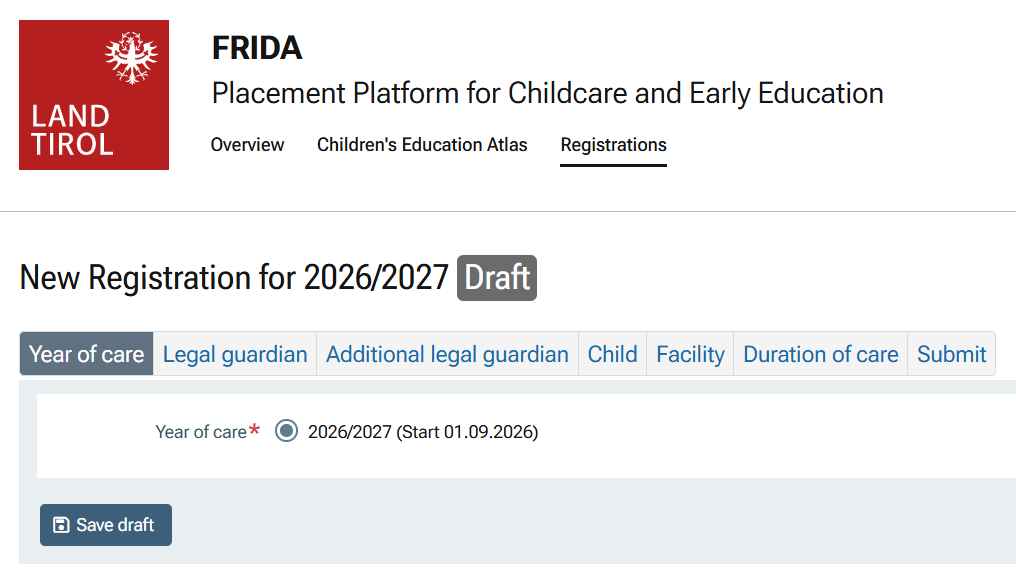
"Year of care": Here, you must select the year of care for which you are registering.
"Legal guardian": Here, for example, name, address, language, contact details and occupation are requested. Under "Employment", you must select between gainful employment, education, parental leave and "seeking employment". The relevant information must be entered or provided by uploading the documents. Note: The type of employment is irrelevant. However, for overall coordination, it is important to know whether parents or guardians are employed. It is also possible to provide no information regarding employment. However, this may affect the ranking when places are allocated.
"Additional legal guardian(s)": As in the previous item, the details of any additional legal guardians must be provided here. • "Child": Here, personal data about the child such as name, main place of residence, first language or additional health-related data (information is voluntary) is requested – as well as previous care.
"Facility": Here, you specify the type of facility for which the child is being registered (crèche, nursery or after-school care) and whether the facility is to be private or public. After you have made your selection, another field will automatically open with "Preferred facility 1" and "Preferred facility 2". A personal preference can be stated for both. Note: After you select "public", the facility located closest your place of residence will automatically be entered as "Preferred facility 1". This does not necessarily have to be selected and can be adapted independently.
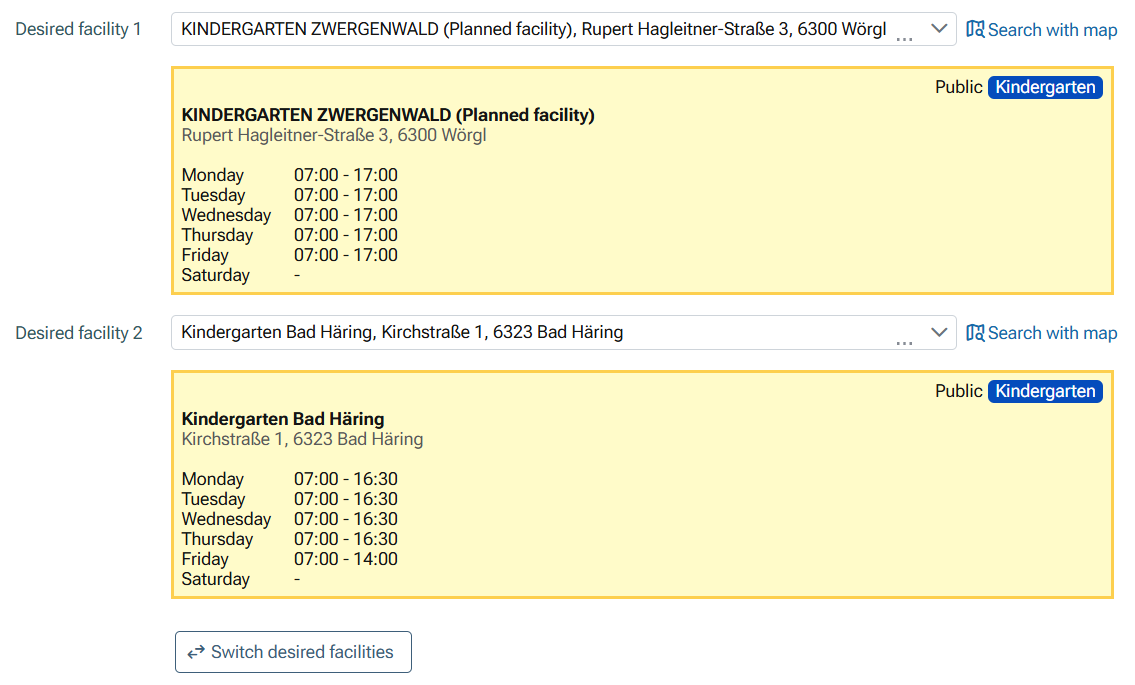
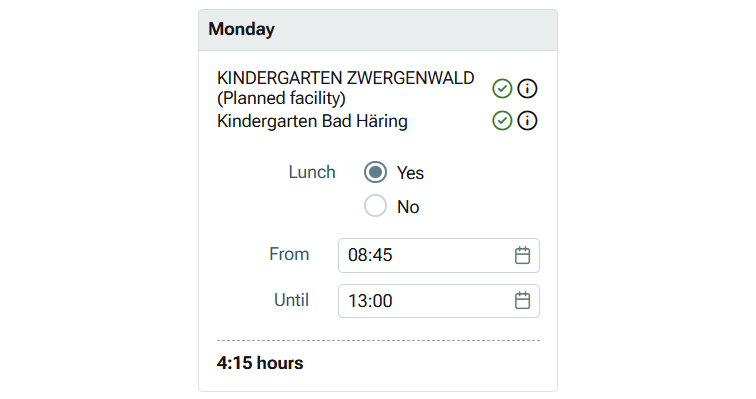
"Scope of care": Even if the required scope of care may not yet be determined in detail at this point in time, the estimated time required should be specified. In most cases, subsequent adaptations are, of course, still possible in direct consultation with the administrator or the facility. In particular, the desired childcare hours for after-school care can only be determined more precisely once school has started. The requirement for lunch and childcare hours must be specified for each weekday. A green tick or an orange exclamation mark automatically indicates whether the selected facility can meet your requirements. In addition, you will be asked whether there is also a requirement for care during holiday periods.
"Conclusion": Finally, you must agree to digital communication and confirm that the data is complete. Both fields are mandatory. Parents will then receive an email confirming that the data has been received.
Deadlines and procedures? You can find them here.